How to sell wholesale on Shopify (2026 guide)
Shopify opened native B2B to every plan in April 2026. Here's what you actually get on Basic, Grow, Advanced, and Plus, the five ways to run wholesale, how to set it up step by step, and the limits nobody publishes.
By Sean McAuliffe · Last updated
The short version
- You no longer need Shopify Plus. Since April 2, 2026, native B2B runs on Basic, Grow, and Advanced at no extra cost: company profiles, payment terms, volume pricing, quantity rules, ACH, and up to 3 active catalogs.
- Plus is now for depth, not access. Unlimited and customer-specific catalogs, contextual checkout, deposits and partial payments, and the right to run your own Shopify Functions.
- If your pricing ran on Shopify Scripts, it stopped working on June 30, 2026. Move it into a B2B catalog, which prices the storefront, draft orders, and the admin alike.
- There are five routes: native B2B, a wholesale app, a separate wholesale store, draft orders with manual invoicing, or custom development with Shopify Functions. Most stores should start with native B2B.
- Know the limits before you commit. No accelerated checkouts (Shop Pay, Apple Pay), no subscriptions, no
checkout.liquid, new customer accounts required, and a cap of 500 line items per order and 200 per draft. - Price at roughly 50 percent of retail (keystone), then enforce MOQs and case-pack increments at the cart rather than in a PDF nobody reads.
- Setup is the easy half. Wholesale revenue is repeat revenue, and it's lost quietly when a good account slips past its reorder cycle and nobody notices.
Most guides to selling wholesale on Shopify are out of date, and they’re all out of date in the same way: they tell you that Shopify’s B2B features require Shopify Plus. That stopped being true on April 2, 2026.
This guide covers what native B2B actually gives you on each plan, what to do if your pricing was running on Shopify Scripts (which stopped executing in June 2026), the five real ways to run wholesale on Shopify, how to set it up step by step, how to price, and the limits nobody publishes. Every plan claim, cap, and number below is linked to Shopify’s own documentation.
I ran a wholesale business on Shopify before native B2B existed, back when the workaround was Scripts on the storefront and manual price edits on every phone order. Where that experience is relevant below, I’ve said so.
Can you sell wholesale on Shopify?
Yes. Shopify has native business-to-business features built into the core product, and since April 2026 they are available on every standard plan. You create company records for the businesses you sell to, give each one its own catalog and pricing, set payment terms like net 30, and take orders through the same storefront and admin you already use.
The important shift is that wholesale is no longer a bolt-on. You don’t need a separate wholesale channel, a password-protected duplicate store, or a discount-code workaround. A single Shopify store can serve retail shoppers and trade buyers from one product catalog and one inventory pool, showing each buyer the prices they have been contracted at once they sign in.
That said, “you can” isn’t the same as “you should, in this exact way.” There are five different routes, and which one is right depends on how many accounts you have and how unusual your rules are. The rest of this guide covers how to pick one and set it up.
Do you need Shopify Plus to sell wholesale on Shopify?
No, not any more. On April 2, 2026 Shopify released key B2B features to the Basic, Grow, and Advanced plans at no additional cost, including company profiles, payment terms, volume pricing, ACH payments in the United States, vaulted credit cards, and up to 3 active B2B catalogs. Plus is still required for the deepest customization.
Here’s the split, taken from Shopify’s B2B features by plan page.
| Feature | Basic and Grow | Advanced | Plus |
|---|---|---|---|
| Companies and company locations | Yes | Yes | Yes |
| Location-level permissions | Yes | Yes | Yes |
| Quantity rules and volume price breaks | Yes | Yes | Yes |
| Net terms and payment reminders | Yes | Yes | Yes |
| ACH payments (US only) | Yes | Yes | Yes |
| Vaulted credit cards | Yes | Yes | Yes |
| Draft orders and PO numbers | Yes | Yes | Yes |
| Easy reorders and quick order lists | Yes | Yes | Yes |
| Sales staff permissions | Yes | Yes | Yes |
| Trade theme | Yes | Yes | Yes |
| Shopify Flow automations | Yes | Yes | Yes |
| Active B2B catalogs | Up to 3, via Markets | Up to 3, via Markets | Unlimited |
| Catalog assigned directly to a company or location | No | No | Yes |
| Contextual checkout and storefront customization | No | Yes | Yes |
| Deposits, partial payments, payment requests per fulfillment | No | No | Yes |
| Custom apps containing Shopify Functions | No | No | Yes |
The catalog limit is the row that decides most upgrade conversations. Below Plus you get 3 active catalogs across all your B2B markets, and they are assigned through Markets rather than attached to an individual customer. In practice that means you can run tiered pricing, for example a retailer tier, a distributor tier, and a key-account tier, but you can’t give one specific customer their own bespoke price list. Customer-level pricing is what Plus is actually selling here.
For a store with a few dozen wholesale accounts sorted into two or three pricing tiers, three catalogs is plenty and Basic will do the job. For a distributor negotiating individual contracts with every account, it won’t.
What happened to the Shopify Wholesale Channel?
The Plus Wholesale Channel was discontinued on June 28, 2024 and replaced by B2B on Shopify. If you find a tutorial telling you to install the wholesale channel and build a separate wholesale storefront, that guide predates the change and the rest of its advice is probably stale too.
The old wholesale channel was a distinct storefront bolted onto a Plus store, with its own theme, its own URL, and its own set of quirks. B2B on Shopify isn’t a channel. It’s a set of capabilities inside the core product: companies, catalogs, price lists, payment terms, and buyer permissions, all showing through your normal storefront to buyers who are signed in.
For what it’s worth, I ran a wholesale-only business on Shopify before any of this existed, and the old wholesale channel wasn’t the answer even back when it was the only option. It assumed you were a retailer bolting a wholesale side onto a consumer store. If wholesale was the entire business, it was too basic to build on.
So the old workarounds no longer apply. Instead of building a parallel store, you teach your existing store to recognize a trade buyer.
What if you were using Shopify Scripts for wholesale pricing?
You need to have already moved. Shopify Scripts stopped executing on June 30, 2026, and editing or publishing them ended on April 15, 2026. If your tiered wholesale pricing ran on a Script, it isn’t running now. The replacement is a B2B catalog for pricing, or a Shopify Function where the logic is more complex than a catalog can express.
This one is personal. I ran wholesale on Shopify before native B2B existed, and we used Scripts to build bulk pricing tiers. It worked, with one enormous caveat: Scripts only ran on the storefront. A customer who went to the website and placed their own order got the right tier price automatically. A customer who picked up the phone didn’t, because the salesperson building that order in the admin was looking at plain catalog prices. Every phone order meant adjusting prices by hand, line by line, and every manual adjustment was a chance to quote a number we couldn’t honor.
That gap is the strongest argument for native B2B catalogs, and it’s easy to underrate until you’ve lived it. A catalog price is the customer’s price everywhere: on the storefront, on a draft order, and in the admin. The pricing belongs to the customer’s company location rather than to code that only fires at the front of the store.
What are the five ways to sell wholesale on Shopify?
There are five, and they work more like a ladder than a menu. Most stores should start with native B2B, add an app only when they hit a specific wall, and reach for custom development only when the wall is load-bearing. Draft orders are the pragmatic starting point for very small operations, and a separate store is a strategic choice rather than a technical one.
| Route | Best for | Plan needed | Main limitation |
|---|---|---|---|
| Native B2B | Most wholesale sellers, especially recurring accounts on agreed pricing | Any | 3 catalogs below Plus, no per-customer price lists below Plus |
| A wholesale app | Stores needing tier logic, order forms, or gated registration that native B2B doesn’t cover | Any | Monthly fee, another vendor in your checkout path, theme integration work |
| A separate wholesale store | Genuinely different catalog, branding, or a wholesale-only business | Any, plus a second subscription | Split inventory, duplicated admin, two subscriptions |
| Draft orders and manual invoicing | A handful of accounts, phone and email ordering, or testing demand before committing | Any | Fully manual, no self-serve buyer portal, 200 line items per draft |
| Custom development with Shopify Functions | Rules the platform won’t express: order minimums, credit limits, case packs, freight logic | Plus for custom apps, any plan via a public app | Needs a developer, and functions can’t call your ERP live |
A note on the fourth row, because it’s underrated. If you have five wholesale accounts who phone their orders in, native B2B is arguably overkill on day one. Creating a draft order with negotiated prices and emailing the invoice is a perfectly respectable way to run wholesale, and it’s how a lot of six-figure wholesale businesses actually operate. Build the infrastructure when the manual version starts to hurt, not before.
How do you set up wholesale on Shopify, step by step?
Setting up native B2B takes about an hour for a first company, and most of that is deciding on your pricing rather than clicking. The order below matters, because customer accounts have to be switched over before anything else works and pricing has to exist before you can test it.
1. Activate new customer accounts. Go to Settings, then Customer accounts, and switch to new customer accounts. Shopify is explicit that legacy customer accounts cannot be used for B2B orders or customers. This is the single most common reason a B2B setup silently doesn’t work.
2. Create the company. Under Customers, Companies, create a record for the business you are selling to. The company is the purchasing entity, not the person. This is the conceptual jump from retail: you’re no longer selling to Dave, you’re selling to Dave’s shop, and Dave is one of possibly several people allowed to buy for it.

3. Add company locations. Add a location for each ship-to address or buying entity. Locations do more work than the name suggests: pricing, payment terms, and tax exemptions all attach to the location rather than the company. A chain with four stores that order separately but bill centrally is modeled as one company with four locations.
4. Assign contacts and permissions. Add the buyers who order for each location, and set their location-level permissions. You can distinguish between someone allowed to place orders outright and someone who can only draft them for approval. That distinction starts to matter once a buyer’s assistant is placing orders.
5. Build the catalog and price list. Create a catalog and set pricing. Shopify gives you three mechanisms and they combine: an overall percentage adjustment across the catalog, fixed prices set per product or per variant, and volume price breaks. Fixed prices override the percentage adjustment where both apply, which is exactly what you want for the handful of lines you negotiate individually.
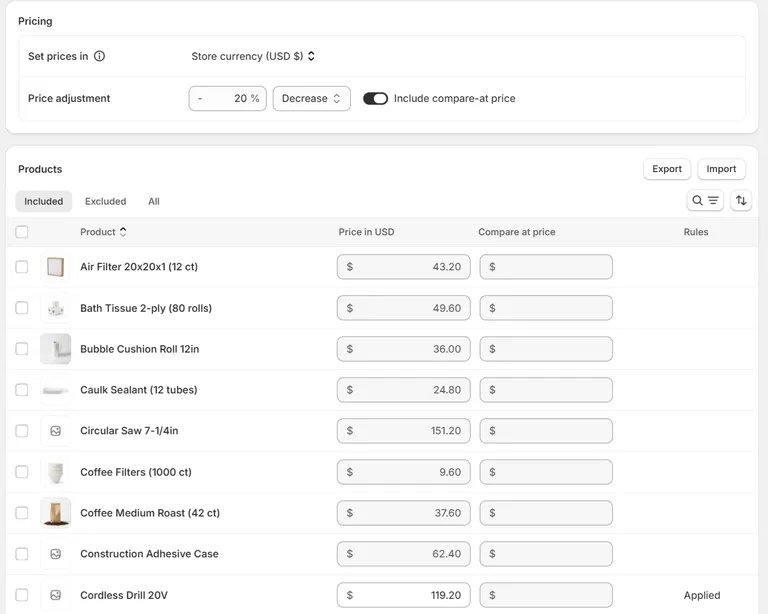
6. Set quantity rules and volume pricing. Quantity rules cover minimum, maximum, and increment. The increment rule is the one wholesale sellers underuse: if your product ships boxed in tens, set the increment to 10 and buyers can only order 10, 20, 30, and so on. Volume price breaks then reward larger orders automatically.
7. Set payment terms. Assign terms to the company location. Shopify supports no terms, net 7, net 15, net 30, net 45, net 60, net 90, due on fulfillment, or a fixed calendar date. Terms can be set per location, per company, in bulk across companies, or on an individual draft order, so you’re not locked into one policy.
8. Publish and place a test order. Publish the catalog to your B2B market, then sign in as a test buyer and place a real order end to end. Check the price on the product page, the price at checkout, the payment terms, and the tax treatment. Wholesale pricing bugs are expensive and quiet, and they show up on an invoice weeks later.
How should you price wholesale?
The default convention is keystone pricing: wholesale is 50 percent of the recommended retail price, so the retailer doubles their money. If a product costs you 10 dollars to make, you would wholesale it at 20 and it would retail at 40. That gives you a 50 percent margin and the retailer reselling it a 50 percent margin, and it’s the number most buyers expect without being told.
Keystone is a starting point, not a rule. Categories vary widely, and there are two common departures. Products with high unit costs and low margins, such as food and beverage, often wholesale at 60 to 70 percent of retail because a 50 percent cut is impossible. Products with strong brands and high perceived value sometimes go below 50 percent, because the retailer’s margin is what buys shelf space.
Beyond the headline number, get three things right.
Minimum order quantity. An MOQ protects you from the accounts that cost more to serve than they generate. Set it in currency for a whole-order minimum, or in units per product using quantity rules. Common practice is a higher opening order than reorder, since the opening order has to cover the cost of setting the account up.
Case packs and increments. If you pick and pack in cases, sell in cases. The increment quantity rule enforces this at the cart, which is far better than a note in a PDF that buyers ignore and your warehouse then has to work around. I spent years building workarounds inside our inventory management system to handle case quantities, purely because the storefront couldn’t express them. Having the rule enforced natively at the point of order removes an entire category of downstream cleanup.
Volume breaks versus a flat tier. A flat percentage tier is simpler to administer and easier for buyers to understand. Volume breaks are better when your own costs genuinely fall with quantity, for example on a full pallet, because they push order size up without cutting your margin on small orders. If your cost curve is flat, volume breaks just give money away.
Finally, produce a line sheet. It is a plain document, one row or one block per product, listing product name, SKU, wholesale price, recommended retail price, MOQ, case pack, and lead time. Buyers ask for one, and having it ready separates you from the sellers who don’t. Once your catalog is live in Shopify the line sheet becomes a summary of the same numbers rather than a separate source of truth.
What can Shopify B2B not do?
Most guides skip this section, and it’s the one that saves you a bad week. Shopify publishes the requirements and considerations for B2B and the list is real. Read it before you commit.
Hard incompatibilities:
- Legacy customer accounts. Not supported for B2B at all. You must move to new customer accounts.
- Accelerated checkouts. Shop Pay, Apple Pay, Google Pay, and Amazon Pay don’t work for B2B orders. Buyers pay by card, vaulted card, ACH in the United States, or on terms.
checkout.liquidcustomizations. If your checkout has been customized throughcheckout.liquid, it is incompatible with B2B.- Subscriptions. Not supported on B2B orders, which is a real problem for anyone running recurring wholesale replenishment.
- Local delivery, pickup points, and tipping. Unsupported.
Off by default and requiring configuration or a support request: gift cards at checkout, pickup in store, line item scripts, and abandoned checkouts.
Hard numbers worth knowing: a maximum of 500 line items per order and 200 line items per draft order. Wholesale orders are big, and the draft order limit is the one people hit first when an account reorders across a full catalog.
None of this makes Shopify a bad wholesale platform, but it does have limits. The failures happen when a store commits to B2B, builds everything around it, and discovers in week three that the subscription product they sell to their best accounts can’t go through it.
When should you use a wholesale app instead?
Use an app when you need a specific behavior that native B2B doesn’t express and you don’t want to pay a developer. The strongest cases are gated wholesale registration with an approval workflow, order forms and fast bulk-entry grids, tier logic more granular than three catalogs allows, and net-terms workflows tied to your accounting system.
The main options on the App Store are SparkLayer, Wholesale Gorilla, Wholesale All in One, and BSS B2B. They differ mostly in whether they replace the buying experience or extend it, and in how much theme work they need. Check three things before you install any of them: whether it works on your plan, whether it coexists with native B2B or expects to replace it, and what happens to your data if you uninstall.
My advice is to try native B2B first. It costs nothing extra, Shopify maintains it, and it won’t break on a theme update. Reach for an app when you’ve hit a specific wall, not as a default first move. Adding a vendor to your checkout path is a real cost even when the subscription is cheap.
When do you need custom development with Shopify Functions?
When your rules are business logic rather than settings. Shopify Functions let a developer inject custom backend logic into checkout: order minimums, credit limits, case-pack expansion, freight options, and payment method rules that no app exposes as a checkbox. Functions compile to WebAssembly and run on Shopify’s own infrastructure, so there is no external server and no added latency.
Understand the plan rule before you budget anything. Shopify states that “only stores on a Shopify Plus plan can use custom apps that contain Shopify Function APIs”, while “stores on any plan can use public apps that are distributed through the Shopify App Store and contain functions.” In other words, bespoke Functions work is a Plus route. On Basic, Grow, or Advanced you get Function-powered behavior only by installing a published App Store app that already contains one.
There are nine Function APIs. These are the ones that matter for wholesale:
| Function API | What it fixes for wholesale |
|---|---|
| Cart and Checkout Validation | Order minimums, maximums, and multiples; credit limits; required PO numbers |
| Discount | Pricing logic a catalog cannot express, such as a tier that depends on cart composition |
| Cart Transform | Case packs and bundles, expanding one cart line into its components |
| Delivery Customization | Freight and pallet options, and hiding retail carriers from wholesale buyers |
| Payment Customization | Renaming, reordering, or hiding payment methods and setting terms |
| Fulfillment Constraints and Order Routing | Sending wholesale orders to a warehouse instead of retail stock |
The Cart and Checkout Validation API is the standout, because Shopify’s own documented use cases for it read like a wholesale requirements document: “Provide B2B product minimums, maximums, and multiples”, “Provide B2B location order minimums, maximums, or credit limits”, and “Validate purchase order numbers for B2B customers.” It also applies to express checkouts, and a store can activate a maximum of 25 validation functions.
One constraint to plan around: functions are pure. They can’t read the filesystem, the clock, or a random number, and they can’t reach the network except through the Discount API’s optional fetch target. “Check this account’s balance against our ERP at checkout” isn’t something a plain function does. If that’s your requirement, you’re building an app with a backend.
So in 2026, Plus is no longer for the basics, which everyone now has. It’s for unlimited and customer-specific catalogs, contextual checkout, deposits and partial payments, and the right to run your own Functions.
What actually decides whether wholesale works: the reorder
Everything above is setup, and setup is the easy half. Wholesale revenue is repeat revenue. A wholesale account that orders every six weeks is worth many times a one-time retail customer, and almost nothing about that relationship is visible in a standard Shopify dashboard.
The failure mode is quiet. An account that reordered every six weeks goes eight weeks, then ten, then stops. Nobody gets an alert, because nothing happened. There’s no cancelled subscription and no churn event, just an order that never arrived while your revenue graph stayed flat because other accounts covered the gap. By the time somebody notices, the buyer has a new supplier and a reason to stay with them.
Catching that requires knowing each account’s normal rhythm and noticing when it slips, which is exactly what RevLogic does. It reads the Shopify order history you already have, learns each customer’s own purchase cycle, and turns it into a prioritized call list: who is overdue against their own pattern, what they normally buy, what they have stopped buying, and what to pitch next. It runs inside your Shopify admin on every plan, and quotes built from a customer card land back in Shopify as standard draft orders.
If you want the mechanics, how health scores are calculated and how churn risk and winback work both go into detail. Set your wholesale up properly using this guide, then make sure somebody notices when a good account goes quiet.
Frequently asked questions
- Do I need Shopify Plus to sell wholesale?
- No. Since April 2, 2026, native B2B features are available on the Basic, Grow, and Advanced plans at no extra cost. That includes company profiles, payment terms, volume pricing, quantity rules, and up to 3 active B2B catalogs. Plus is still required for unlimited catalogs, catalogs assigned directly to a company or location, deposits, and partial payments.
- Can I sell wholesale and retail on the same Shopify store?
- Yes. Shopify B2B is designed to run alongside your direct-to-consumer business on one store, with one inventory pool and one admin. B2B buyers see their own catalog and pricing once they are signed in to a company location. You can also run a separate wholesale-only store if the catalogs and branding need to be genuinely different.
- How much does Shopify wholesale cost?
- There is no separate wholesale fee. Native B2B is included in your existing Shopify subscription on Basic, Grow, Advanced, and Plus. Costs only appear if you add a third-party wholesale app, run a second store for wholesale, or pay a developer to build custom Shopify Functions.
- What happened to the Shopify Wholesale Channel?
- The Plus Wholesale Channel was discontinued on June 28, 2024 and replaced by B2B on Shopify. If a guide tells you to install the wholesale channel, it's out of date. B2B is now built into the core product rather than being a separate channel with its own storefront.
- I was using Shopify Scripts for wholesale pricing. What now?
- Scripts stopped executing on June 30, 2026, and could no longer be edited or published after April 15, 2026, so any tiered pricing that ran on one has already stopped working. Move the pricing into a B2B catalog, which applies everywhere including draft orders and the admin, or into a Shopify Function if the logic is more complex than a catalog can express.
- Can I set a minimum order quantity for wholesale customers?
- Yes. Quantity rules in a B2B catalog let you set a minimum, a maximum, and an increment per product, so a product boxed in tens can be forced to sell in tens. For a whole-order minimum or a credit limit rather than a per-product rule, you need the Cart and Checkout Validation Function API.
- Do I need a wholesale license to sell on Shopify?
- Shopify doesn't require one. Whether you need a license, a resale certificate, or a seller's permit depends on your country, state, and what you sell, and the same is true of collecting resale certificates from your buyers so you can sell tax exempt. Shopify supports per-location tax exemptions for B2B, but the compliance question is one for your accountant.
- How do I create a wholesale page in Shopify?
- With native B2B you don't build a separate wholesale page. Buyers sign in to a company location and your existing storefront shows them their catalog and contract prices. If you want a public page where prospective wholesale buyers apply for an account, create a normal page with a form, then approve applicants by creating a company for them.
- Can B2B customers use Shop Pay or Apple Pay?
- No. Accelerated checkouts including Shop Pay, Apple Pay, Google Pay, and Amazon Pay are not supported for B2B orders. B2B buyers pay by credit card, vaulted card, ACH in the United States, or on net terms. This trips people up most often when they test wholesale checkout expecting the same experience as retail.
- How many line items can a wholesale order have?
- Shopify allows a maximum of 500 line items per order and 200 line items per draft order. That's generous for most wholesale, but worth knowing if you sell into large accounts that reorder a full catalog at once, because the draft order limit is the one people hit first.
- Is Shopify good for wholesale?
- It's now a reasonable default for small and mid-sized wholesale, especially if you already sell direct-to-consumer and want one catalog, one inventory pool, and one admin. It's weaker where you need complex order minimums, credit limits, EDI, or deep ERP integration, and those gaps usually get filled by an app or by custom Shopify Functions.
About the author
Sean McAuliffe , Founder, RevLogic
Sean McAuliffe has spent 20+ years in wholesale distribution and multichannel ecommerce. He founded International Key Supply and scaled it past $20M, created the Keyless2Go brand, and has been through two private equity exits. He built RevLogic to solve a problem he had running his own wholesale sales team.